
Today’s most effective classrooms put students to work: speaking, building, and sharing. Here is how AV technology supports collaboration in an active learning classroom, and what to plan before you build one.
Summary
An active learning classroom is a space designed so students work in groups, create content, and present it to the class instead of only listening to a lecture. Active learning classroom technology typically includes group displays, wireless content sharing, speech reinforcement, and simple automated control, so any student or instructor can share ideas in seconds.
What is an active learning classroom?
An active learning classroom is built around student participation rather than one-way presentation. Learners solve problems in small groups, then share their results with the whole room. The philosophy has been around for decades. What has changed is the educational AV technology that makes it practical at scale.
That shift matters because, for years, the typical classroom saw little real innovation. Large mounted displays and projectors replaced whiteboards, but they stayed passive: one source, one screen, one presenter. Active learning spaces ask more of the technology.
“It’s not just the teacher who does all the talking and presenting. They turn it around and get the students to do the speaking and presenting, break out into groups, and then share results at the end, which of course involves AV.”
Daniel Routman, Director of Innovation, Ford AV
Routman is quick to add that there is no true plug-and-play system for active learning, and that institutions are still defining what it means for them. That is exactly why planning the AV early matters.
Active learning classroom technology: what AV does the work
Every campus defines active learning a little differently, but most active learning classroom AV designs rely on the same four building blocks:
1. Group displays
A display at each table or pod lets teams build and refine their work together.
2. Wireless content sharing
Students and instructors send content from any device to a group display or the main screen, with no cables or adapters.
3. Speech reinforcement
Microphones and speakers make sure every group can hear the others and every voice reaches the room.
4. Lecture capture and hybrid tools
Classes are recorded or streamed so on-site and remote students share the same experience.
Software and cloud platforms such as Zoom and Microsoft Teams make this collaboration possible, which has changed what integrators deliver.
“The shift I’m seeing is that we went from selling individual AV systems to selling digital platforms that connect the classrooms.”
Daniel Routman, Director of Innovation, Ford AV
Screens still matter, too. For every platform students use to create content, the room needs a way to show it to everyone, through large-format LED or LCD displays or projection. Michelle Hull of Level 3 Audiovisual sees the same demand: wireless sharing, collaborative products, and soft-codec videoconferencing are driving installations.
Designing active learning spaces: layout comes first
Active learning spaces often replace rows of individual desks with modular pods: round tables that seat a small group. Routman worked on this kind of design with the University of Arkansas, giving each station its own display so teams could work together, then share their content on a larger display for the whole class.
“We’re seeing things like the Solstice Pod, which has this capability where you can have a pod at each table and then at any point you can share from one pod to another pod, or to all pods.”
Daniel Routman, Director of Innovation, Ford AV
Don’t let aesthetics beat visibility
Today’s AV can be minimized and disguised, but Routman cautions against putting looks ahead of learning. He recalls a classroom where the projector sat off to one side to keep a glass wall clear, so only part of the room could see the screen. Viewing distance and sight lines should come first.
“AV quality being sacrificed for aesthetics I think is detrimental to a learning environment. It’s supposed to help, and you’re taking away from them the ability to see and hear clearly.”
Daniel Routman, Director of Innovation, Ford AV
Keep collaborative classroom technology simple
The more complicated the system, the less it gets used. Hull says classroom systems should be designed with the ever-changing end user in mind.
“They need to be as simple to operate as your iPhone.”
Michelle Hull, Project Manager, Level 3 Audiovisual
Routman points to automation as the fix. Replacing outdated, complex gear, such as a large switcher routing every source, lets the room respond to the user instead of the other way around: plug in a laptop and it simply appears on screen.
Students bring their own devices, too. Digital natives expect their phone, tablet, or laptop to connect to the room, so collaborative classroom technology has to welcome third-party devices rather than fight them. And with lecture capture, a class can be uploaded to a content management system, where students log in with their university credentials and pull up any lecture, on campus or at a distance.
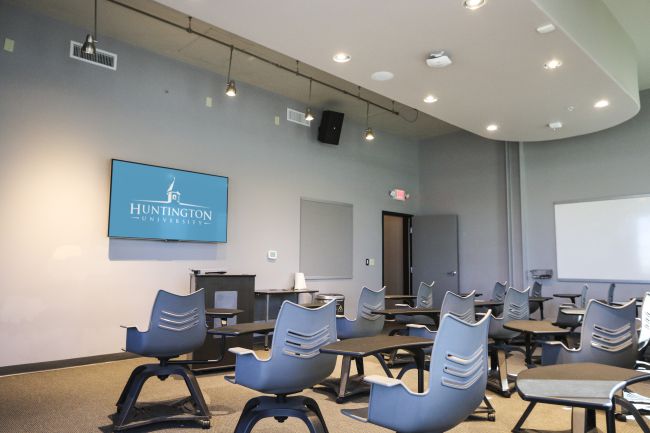
An active learning classroom planning checklist
Before you design or upgrade a room, work through these questions:
- How will faculty define active learning here: small groups, studio-style, flipped, or a mix?
- Can every student see and hear from every seat or table?
- Can anyone share wirelessly from any device?
- Will the room work equally well for remote students through capture and hybrid tools?
- Is control automated and consistent from room to room?
- Who supports, monitors, and updates the AV after installation?
For consistent rooms across a campus, explore our classroom and lecture hall AV solutions, or read how higher education AV technology is changing learning environments.
Frequently asked questions
What is an active learning classroom?
What technology does an active learning classroom need?
How is active learning technology different from traditional classroom AV?
Can an active learning classroom support remote students?
Ready to Plan Your Active Learning Classroom?
Ford AV designs, installs, and supports classroom AV for K-12 schools, colleges, and universities nationwide, backed by 50+ years of experience.
Keep Reading
Higher Education AV Technology
How AV is transforming learning environments.
Lecture Hall & Classroom AV
Scalable rooms for every campus.
Interactive Displays
Touch-enabled, collaborative learning.